





Already Pay for ChatGPT or Claude? 7 Ways to Build and Publish an App (2026)
If you pay for ChatGPT or Claude, you already have an assistant that can write an app. What it can't do on its own is run one. A calculator or a menu only needs a page online. A booking system or a client portal needs more: somewhere to keep records, a way for people to sign in, and hosting that keeps it running after you close the chat.
Some services add those pieces to the assistant you already use. Others, such as Lovable and Replit, are AI builders of their own, with their own usage charges. This guide compares seven options by what you set up, what you pay for, and what kind of app each one suits.
The short version
• Floot: build from ChatGPT, Claude or Codex, with the database, sign-in and hosting managed for you, and email, payments, scheduled jobs, push notifications and AI features ready when the app needs them.
• ChatGPT Sites: build and publish web apps without leaving OpenAI's tools.
• Claude artifacts: small interactive tools you use and share inside Claude.
• Claude Code or Codex with Supabase and Vercel: pick each service yourself and connect them.
• Static hosting: enough for a page with nothing to save.
• Lovable and Replit: separate AI builders, worth a look if a second AI budget is fine.
Before you choose
Start with what people will do in the app. Does it need to remember bookings, take uploads or keep each customer's records apart? Who will use it, and how will they sign in? Those answers narrow the list faster than any feature comparison.
Then keep two costs apart: building the app and running it. Your AI plan may cover the building. Hosting, storage, email and any AI features inside the finished app can still cost money, whichever option you pick.
The options at a glance
|
Option |
Where you build |
Cost of building |
What's managed for you |
Main trade-off |
|
Floot |
ChatGPT, Claude, Codex or another compatible assistant |
Your assistant's plan, within Floot's daily build-action limits |
Database, sign-in, file storage, email, payments, scheduled jobs, push notifications, AI services and hosting |
Apps run on Floot's services; moving elsewhere means replacing them |
|
ChatGPT Sites |
ChatGPT or Codex |
Your OpenAI plan and its limits |
Database, file storage and hosting |
Built around OpenAI's tools |
|
Claude artifacts |
Claude |
Your Claude plan and its limits |
Runs inside Claude; text storage on paid plans |
Small tools rather than a standalone product |
|
Claude Code or Codex + Supabase + Vercel |
Your coding agent, on your computer |
Your agent's plan or API billing |
Managed database, authentication and hosting; you connect the services |
More setup and upkeep |
|
Static hosts |
Any assistant, then a host such as Netlify |
Your assistant's plan |
Hosting for the page only |
Other services needed for accounts or saved data |
|
Lovable |
Lovable's builder |
Lovable credits |
Backend and hosting |
A second AI budget |
|
Replit |
Replit's development environment |
Replit Agent usage |
Backend and hosting |
Agent and running costs to watch |
1. Floot: your assistant builds the app, Floot runs it
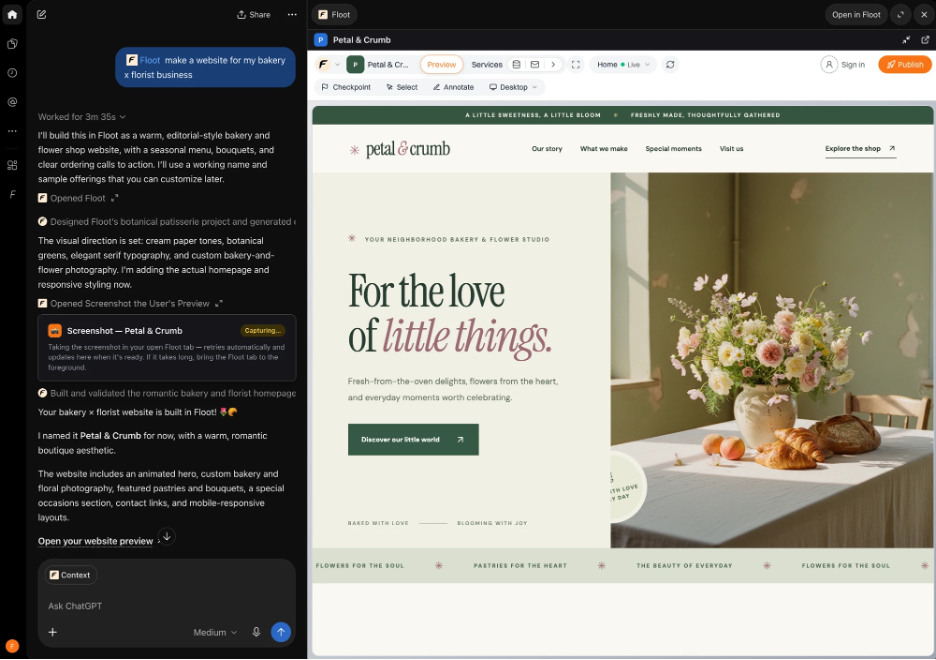
Floot works through the assistant you already use. Once you connect Floot to ChatGPT, Claude or Codex, you describe the app in the chat. Your assistant writes and changes the project, Floot runs it, and a live preview shows the app while the work happens.
Every project starts with a Postgres database, user sign-in, file storage and hosting. Your customers sign up with an email address or a Google account; they don't need an AI subscription to use what you've built.
The services apps usually need next are already there, so you don't have to choose and wire up a separate provider for each: sending and receiving email, payments through Stripe with a test mode in the preview, scheduled jobs such as a nightly cleanup or a weekly digest, and push notifications to phones and browsers. The app can also have AI features of its own, such as a support chatbot or a document summarizer. A few still need a step of their own before they go live: emailing your customers needs a verified sending domain, and live payments need Stripe onboarding.
When it's ready, you can publish it for everyone or only for the people you invite, and build iPhone and Android versions from the same project; store accounts and app review still apply. Because the project lives in Floot rather than in one conversation, you can start it in ChatGPT and keep working on it from Claude or Codex.
Ordinary code edits use your assistant's AI plan. They count toward your Floot plan's daily build-action limit, and your assistant's own usage limits still apply. Image generation and AI features running inside your app have separate usage charges in Floot credits; for your app's AI features, you can use your own AI provider key instead. Scheduled jobs, live payments and custom domains need a paid plan.
Pros
• Keep the assistant you already use, or switch assistants on the same project.
• Database, sign-in and hosting, plus email, payments, scheduled jobs, push notifications and AI services, without choosing and wiring separate providers for each.
• Public or invite-only publishing, and iPhone and Android builds.
Cons
• Daily build-action limits apply; building isn't unlimited.
• You own the code and data, and paid plans can export the code, but hosting it elsewhere means replacing the Floot services it uses.
Pricing: free to start, including publishing a live app; paid plans from $25/month, with a monthly hosting allowance included. Hosting beyond the allowance costs extra.
2. ChatGPT Sites: publishing built into OpenAI's tools
ChatGPT Sites builds and hosts web apps from ChatGPT or Codex. With a database and file storage, it can handle more than landing pages, and there's no separate hosting account to set up. If you already work in OpenAI's tools, it's the first thing to try.
Visitors can sign in with ChatGPT, and the documentation also describes support for external identity providers, so check that the sign-in your audience needs is covered. Sites permits third-party payment processors. It publishes web apps only; it doesn't build iPhone or Android apps for the app stores.
Pros
• Nothing to connect if you already use ChatGPT.
• Database, file storage and sharing options built in.
Cons
• Built around OpenAI's tools, not for moving between ChatGPT and Claude.
• Availability and limits depend on your plan and workspace settings.
Pricing: check availability and limits on your OpenAI plan.
3. Claude artifacts: small tools inside Claude
Artifacts suit calculators, trackers, interactive explanations and other small tools. You describe one in Claude, refine it beside the conversation and share it.
On paid plans an artifact can remember information between visits, but that storage is text-only and limited per artifact, and a tool that calls Claude runs on each person's own Claude account. That's plenty for a workshop exercise or a tool for colleagues. A customer-facing product with its own domain and accounts is a different job.
Pros
• Quick to make and share, with no hosting to configure.
• Personal and shared stored data on paid plans.
Cons
• Text storage isn't a full database or file store.
• AI features depend on each visitor's Claude account.
Pricing: artifacts are available on free and paid Claude plans; persistent storage needs a paid plan.
4. Claude Code or Codex with Supabase and Vercel: choose every service yourself
Here your coding agent writes the app, Supabase provides the database and sign-in, and Vercel hosts it. You can swap any of them for another provider, and it's a natural fit if you already use them.
The price of that control is upkeep. Your assistant can help with setup, but the accounts, settings and deployments are yours to manage. When a login works on your computer but fails on the live site, you're the one who works out which service is responsible.
Pros
• Choose each service independently.
• Use the development tools and agent you prefer.
Cons
• More accounts, credentials and settings to maintain.
• You're responsible for the connections between services.
Pricing: free tiers can cover a first project; each service has its own paid plans and usage charges. Agent costs depend on whether you use a subscription or API billing.
5. Static hosting: no backend if you don't need one
A menu, portfolio, calculator or event page may not need a database at all. Your assistant writes the files, and Netlify, Cloudflare Pages or GitHub Pages puts them online, either by upload or from a code repository.
A static page can still be interactive. What it can't do on its own is anything that depends on a server: customer accounts, shared records or payments each need another service.
Pros
• Free tiers can be enough for simple pages.
• Nothing to configure behind the page.
Cons
• Accounts or shared data mean adding backend services.
• Publishing changes is a separate step unless you set up automatic publishing.
Pricing: free tiers, with limits and optional paid services.
6. Lovable: a dedicated AI app builder
Lovable is a browser-based builder with its own AI, backend and publishing. It suits people who would rather work in a dedicated app-building interface than in their general assistant.
Its building runs on Lovable credits, separate from your ChatGPT or Claude subscription. That isn't a reason to rule it out, but budget for it rather than assuming your existing plan covers it.
Pros
• A browser-based interface built for making apps.
• Backend and publishing included in the platform.
Cons
• Your existing AI subscription doesn't cover Lovable's credits.
• Check both building and running costs for the app you have in mind.
Pricing: free and paid credit-based plans.
7. Replit: an AI agent and a development environment in one
Replit pairs its AI Agent with a browser-based development environment. You ask the Agent to build, look through the files, and run or publish the app in one place, which suits people who want to see and edit the code as they go.
Replit Agent has its own usage billing and doesn't draw on your ChatGPT or Claude subscription, so budget for Agent work as well as hosting.
Pros
• The agent, the code and the running app in one environment.
• You can edit the files yourself as well as through the agent.
Cons
• Agent work has separate usage charges.
• Hosting and other running costs need a budget too.
Pricing: free and paid plans, with Agent and hosting limits or charges depending on the plan.
Which should you start with?
For a simple page, use static hosting. For a small tool that lives in Claude, try an artifact. If you work in ChatGPT or Codex and need a web app, see whether Sites covers it.
Floot is the one to start with when you want to keep your assistant and the app needs more than a database and hosting: email, payments, scheduled jobs, push notifications or AI features, without choosing and wiring a separate provider for each. Lovable or Replit may suit you better if you prefer their interfaces and are happy to budget for their AI usage.
Whichever you pick, build one complete workflow before anything else. A booking form that really saves and finds a booking tells you more than a polished homepage.
FAQs
Can I use my existing ChatGPT or Claude subscription to build an app?
Yes. With Floot, ChatGPT Sites or Claude artifacts, your assistant builds the app on the plan you already have. Whether the app can also be published and keep its data depends on the option you choose, and hosting or other services may still cost extra.
Do I need to know how to code?
Not for Floot, Sites or artifacts. You still need to try the app, explain what isn't working and check that it does what you meant. The Supabase-and-Vercel route expects more technical setup.
How is Floot different from ChatGPT Sites?
Both host web apps your assistant builds. Sites is built around OpenAI's tools; Floot works with ChatGPT, Claude, Codex and other compatible assistants. Floot also comes with email, payments, scheduled jobs, push notifications and AI services, and builds iPhone and Android apps for the app stores.
Can I switch from ChatGPT to Claude without rebuilding?
With Floot, yes: you can keep working on the same project from a different assistant. Your old conversation doesn't move with it, so tell the new assistant what the app is for and any decisions it should know about.
Is building with Floot unlimited if I already pay for my AI?
No. Ordinary code edits use your assistant's AI plan, within your Floot plan's daily build-action limit and your assistant's own limits. Image generation and AI features running inside your app have separate usage charges, and paid plans include a hosting allowance rather than unlimited hosting.
Can my app have user accounts and take payments?
Yes, with an option that supports them. Floot includes user sign-in and Stripe payments: test payments work in the preview, and live payments need a paid plan. The other options each have their own setup, and a static page needs extra services for both.