






Free AI Detector Tested for Accuracy: Inside AIscanner.io
AI detection matters now in a way it did not even a year ago. Students use AI for brainstorming, outlining, and editing support, while teachers and platforms look much more closely at what feels machine-written. That creates a messy middle. A paper can be fully researched, carefully revised, and still trigger suspicion because the phrasing feels too polished or too uniform.
That is why I want to find an AI detector that can get it right and help students check their papers before submission. I tested https://aiscanner.io/ the way a student would actually use it: on a short reflection paper, a research-style paragraph, a lightly edited draft that had gone through grammar cleanup, and a few obviously AI-written assignment samples. I also checked how readable the results felt, how fast the scan was, and whether the tool seemed fair to normal college writing rather than harsh by default.

AI Scanner for Real Student Writing
The first thing I liked about AIscanner was the basic experience. The site is easy to understand, and the scan flow is simple: paste text, wait a moment, then read a score and flagged sections.
The homepage says the tool can assign a 0 to 100 score, flag likely AI passages, and work across major models such as GPT, Gemini, Claude, Grok, DeepSeek, and Llama. It also presents itself as free and designed for repeated use, which matters for students who often revise the same assignment several times before submission.
What made the tool useful in practice was the way the results were presented. In my tests, the report gave enough direction to understand why something looked suspicious. That matters more than a dramatic percentage on its own.
What worked well:
-
The interface felt clean and quick to learn.
-
The score gave a clear first impression.
-
Highlighted sections made revision easier.
-
It fits common student situations, especially draft checking before submission.
What I would still keep in mind:
-
No detector should be treated as final proof.
-
A score still needs human judgment.
That last point is important. AIscanner itself says no detector can be trusted 100% of the time, and that writing style, paraphrasing, and ESL patterns can affect results. I appreciated that honesty because it keeps expectations realistic.
Where This AI Detector Feels Most Useful
The strongest use case, at least for me, was the final review stage before submission. If you are a student, that is usually the stressful moment. You have already done the reading, written the draft, and fixed the citations, and now you want to know whether anything about the wording could raise questions. In that role, this AI content detector felt practical.
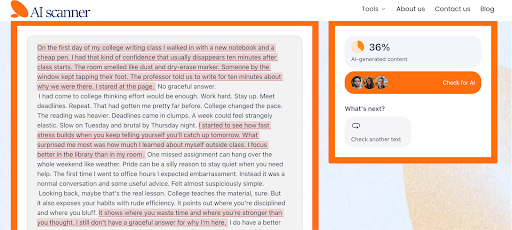
To test AIscanner.io in a realistic way, I used a short reflection piece generated by ChatGPT and edited by a student for a first-year writing class. The goal was to see whether AIscanner could recognize that. This felt like a fair test because it reflects a very common academic scenario.
The result came back at 36% AI-generated content, with several lines flagged across the piece. That felt believable to me. The text was not fully raw AI output anymore, but it also was not fully untouched human writing. It sat in that in-between zone, and the score captured that.
That matters because many students now work in exactly this way. They may start with an AI draft, revise it, add their own experience, and polish the tone. A result like this gives a more useful signal than a simple yes-or-no label. It shows that AIscanner can pick up generated patterns even after editing, which makes the feedback feel more accurate and practical for real student writing.
Is AIscanner.io the Most Accurate AI Detector?
This is where an objective review needs some distance. AIscanner says it can reach up to 99% accuracy, and it repeatedly presents itself as a highly accurate detector with a low false-positive rate.
I would say it definitely feels more thoughtful than many detectors that jump straight to harsh conclusions. The site’s own explanation of how it works also sounds more nuanced than the usual black-box pitch. It describes looking at syntax, word choice, sentence structure, semantic coherence, and broader patterns associated with AI-generated text. It also says the system is updated to account for new models and bypass tactics.
Tips for Using AIscanner.io
After testing AIscanner on the reflection piece, I found that it works best when you use it as a comparison tool. I also ran a short research-style paragraph, a lightly polished discussion post, and a more obvious AI draft with generic wording and flat transitions. That gave me a better sense of how the detector reacts to different levels of editing.
My advice is simple: scan more than one version of the same text. Check the raw draft, then the edited version, and compare the score. You start to see which sentences trigger suspicion and which revisions actually help.
This is especially useful if you are treating it like an originality AI detector before submitting coursework. You can catch lines that sound too smooth, too vague, or too machine-shaped, then rewrite them in your own voice. I would also use the rest of the platform for a fuller check. AIscanner.io includes plagiarism scanning, paraphrasing, and a humanizer, so it works better as a full review stop before submission than as a single detector on its own.
Final Thoughts
My overall impression is very positive. AIscanner.io gives students something useful: a detector that feels helpful and accurate. It works well with mixed drafts, which matters when a paper has been generated, edited, and polished before submission.
As an AI detector text tool for college-style drafts, it works well. I would use it as a checkpoint, especially before submitting essays, reflection papers, and discussion responses, where tone can easily drift into AI-like phrasing after heavy editing. It gives enough detail to revise with purpose.